Overview
Data Protection provides backup protection for desktop and laptop data. Desktops and laptops are known as devices or endpoints. All endpoints are backed up to a single location known as the vault. An optional QuickCache can be used for faster backups in local environments. Backed up data can be restored from the vault to any device, any time, anywhere.

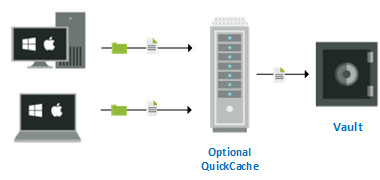
To configure protection, an administrator or user selects the files to be backed up and how often the files are checked for changes (default every 15 minutes). Once protection is configured, the files are backed up and protected, as long as the computer is running. Protection occurs locally if the computer is not connected to the local network or Internet. The changes are sent to the vault (or optional QuickCache) when the computer is back online. You do not need to take any additional action unless you want to change the protection configuration or restore files. If you want to restore files, they are downloaded from the vault to the original location or a new location. In the event your computer crashes or is stolen, you can restore all of your protected files to your replacement computer.
These help pages are for users running the Data Protection console on their desktop or laptop. They include information for protecting your data, restoring your data, and erasing your data on the vault.
If your administrator pushed the application to your device, parts of the console may be disabled, meaning only some of these pages will be applicable to you, depending on what you have access to.