Console
The Data Protection console is where you can protect and restore your files. Once you have configured your protection, you do not need to have the console running in order for your selected files to be backed up. The files are backed up and protected as long as your computer is running
You can access the console from the desktop icon if there is one or from Start on Windows and from Launchpad on MacOS.
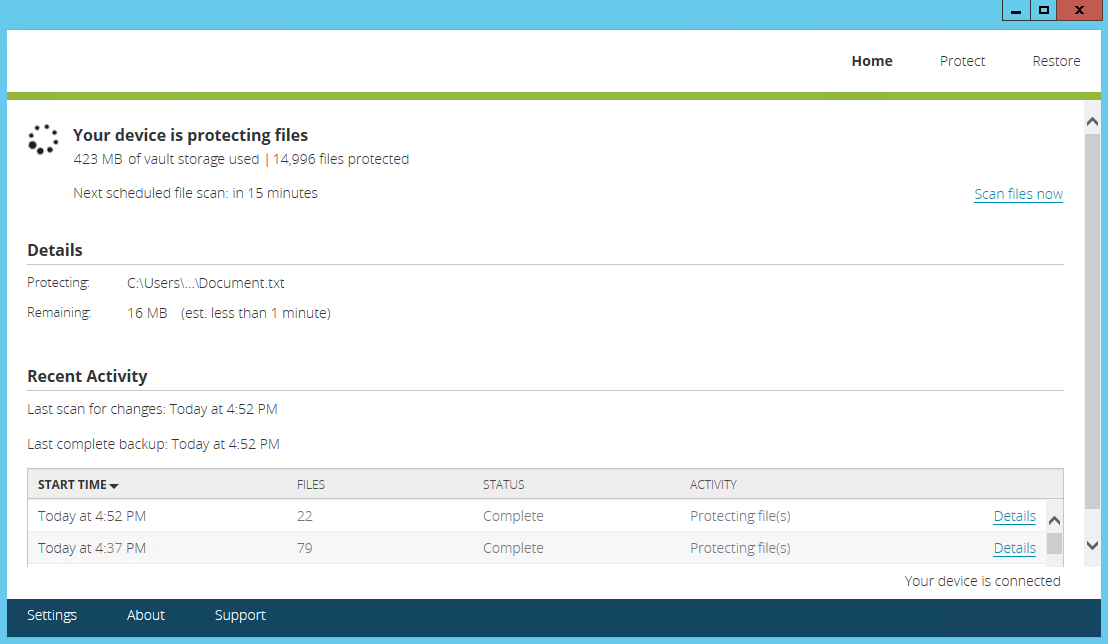
By default, the console has three tabs, Home, Protect, and Restore, across the top right of the console that access the different areas of the application. Your view may vary depending on the access your administrator has granted. At the bottom left bottom you will see a Settings link to access protection settings and links to access console information and help. Towards the bottom right corner of the console, under the activity table, you will see a status message indicating if your device is connected to the vault.
Most of your interaction will be with the three navigation tabs.
-
Home—This tab is the main tab that shows protection summary and activity details for your protection and restores.
-
Status—The top section shows the current status, for example, if your device is protected or unprotected or if it is in the process of backing up or restoring files. This section also notes when your next scheduled scan will be.
If you want to start a manual backup scan immediately, click Scan files now. If you manually scan, the timing of your next scheduled scan will be reset.
If you have any issues with your protection, you will see an Alerts box in the top section. If the alert has additional information, click the link to see the details. See Resolve file issues for details.
- Details—The middle section shows if a backup or restore is actively occurring along with processing information. If it is blank, nothing is currently being scanned or processed.
- Recent Activity—The bottom section shows each individual protection scan or restore processing including when it occurred, the number of files backed up or restored, the status of the process, and the type of activity. If you want to see detailed information on the individual process, click Details. Other processing activity, for example after a device reset, may not have details available.
-
-
Protect—This tab is where you configure the files you want to back up. See Protection for details.
In addition to configuring the files you want to protect, you can configure the protection process. Click Settings in the footer at the bottom of the console. See Configure the protection settings for more details.
- Restore—This tab is where you can restore files that have been protected. See Restore files from the vault for details.
Depending on your device configuration, especially if you are running anti-virus or firewall software, you may see the console indicate it is not responding. This is generally a transient issue that will resolve itself. If you find the console frequently not responding, you may want to contact your administrator to see about approving Data Protection as a safe application within your anti-virus or firewall.